
Overview:
The ability to proxy your access to someone else is active in Production since an upgrade to 12.2.4 of EBS. It may also be available in some 12.1.3...
Multi-Factor Authentication (MFA) is a security control that requires users to verify their identity with more than one method. For ERP systems, this is typically a password plus a time-sensitive code from an authenticator app before gaining access to the system.
If your NetSuite (or any ERP) password is the front door key to your business, then Multi-Factor Authentication (MFA) is the deadbolt. It’s a simple concept with massive security impact: even if someone steals your password, they still can’t get in without that “second factor.” In the world of finance systems, that extra layer isn’t just nice to have—it’s a control requirement.
Bottom line: If you want to protect your core ERP systems, MFA isn’t optional and must be ingrained in your internal control DNA.
One misconception is that MFA is an all-or-nothing switch for all ERP systems. In reality, ERP systems offer one or multiple of the following methods for configuring MFA:
In NetSuite, MFA is only configured and enforced at the role level—there is no way to apply it directly to individual users or globally across an environment. This means MFA requirements are tied to the specific roles a user can access. If a user attempts to access any role with MFA enabled, they must complete the MFA process before gaining access. This creates a potential security gap, which is why the safest practice is to ensure that every role assigned to a user has MFA enabled. NetSuite does hardcode MFA requirements for certain high-risk standard roles, such as the Administrator role, which always require MFA regardless of your settings. You can manage MFA enforcement for other roles under the Two-Factor Authentication Roles Page.

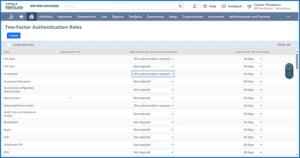
NetSuite’s MFA is based exclusively on authenticator applications that comply with the OATH TOTP standard, such as Google Authenticator or Microsoft Authenticator. During setup, users link their preferred app to NetSuite, which then generates a unique, time-based verification code for each login. These codes are valid only once and expire after a short period, adding a strong layer of protection beyond the user’s email and password. At the end of setup, users also receive a list of single-use backup codes to use if their authenticator app is unavailable.
The reason this matters so much is simple: most compromised accounts share the same story of password stolen, no MFA in place. While MFA won’t make you bulletproof, it drastically lowers the odds of a breach turning into a full-blown incident. In the context of financial systems, it’s also one of the most defensible IT General Controls you can have during a SOX or ISO 27001 audit.
In Part 2 of this series, we’ll explore why MFA should be universally applied to all roles, why there should be no exceptions for end-user accounts, and what controls you need in place to ensure your ERP system isn’t hacked. Because in the end, the best MFA policy is one that protects all user accounts.
The ability to proxy your access to someone else is active in Production since an upgrade to 12.2.4 of EBS. It may also be available in some 12.1.3...

Think of your NetSuite environment like your company’s HQ. If the front door is flimsy, it doesn’t matter how many security cameras...