Wilkins RV is the premier RV dealer in New York, with over 1,000 units spread across seven locations. They’re a third-generation dealer renowned for their wide...
When the showroom is moving fast and your team needs to act, our popup promotion feature allows you to post or remove a pop-up on short notice. Whether you need to launch a sale, announce a holiday closing, or share an urgent update, you decide what your customers see and when. It’s your website, your terms. No waiting, no tickets, no bottlenecks.


How It Works
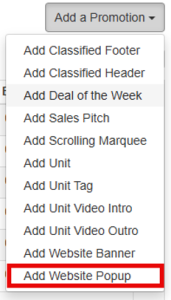
Using the Popup Promotion tool is simple and the entire process for uploading, modifying or removing a popup can be completed within the iCommand Center. 1. Under the “Add a Promotion” drop down menu, select “Add Website Popup”. 2. Once the module appears, name your promotion, select a start and end date, a hyperlink if desired, and upload the popup image. Note : Popups are usually 600x600px, but there are no limitations depending on your need. 3. You can then navigate to the Criteria tab and choose which pages or sections should display the message. Note : If you’d like to add a form to your popup, this will still need to be accomplished through your Account Manager. 4. Publish, and your pop-up goes live exactly when you want, right where you need it.