Microsoft, with its proliferation of products and services, strives to provide management tools that would make life easy for users, administrators and managers through portals and admin centres. Some can be intuitively found while others may need a bit of digging and searching.
I have managed to create a list of all of them which I am happy to share if it can help you find your way.
Please let me know if you think I have missed any.
Main portals:
These are portals that contain (almost) everything related to Azure, Office and/or Microsoft 365 (M365). Some management tools can be found on 1, 2 or on all 3 portals. For instance, Azure AD Users can be managed from the Azure portal and in the Microsoft 365 Admin Centre portal as well (which can itself be accessed from Admin link in the Office 365 portal)
- Azure portal – portal.azure.com
- Office 365 portal – portal.office.com
- Microsoft 365 portal – admin.microsoft.com
Azure portals
Beyond the main Azure Portal, there are several Azure portals:
- You can preview what is coming to Azure via the Azure Preview portal at preview.portal.azure.com.
- If you subscribe to Azure services as a non-profit organization to benefit from specific services and discounts, you could log on to nonprofit.microsoft.com/#/ngoportal.
- Finally, if you have an Enterprise Agreement with Microsoft then you will get an invitation to access the ea.azure.com portal where you can manage costs for the Azure EA services. This is also where you can create an Azure EA hierarchy including Departments, Accounts and Subscriptions.
Azure services related portals
- Azure Active Directory admin centre – aad.portal.azure.com. This portal can be accessed from portal.azure.com and from the Microsoft 365 admin centre as well.
- Azure Lab Services: labs.azure.com. As an education provider, you can setup accounts for your educators so that they may in turn create (repeatable) lab environments for their students.
- Multi-Factor Authentication – Multi-factor authentication (windowsazure.com)
Users and Devices management
These portals allow you to manage anything and everything about your Azure AD / Microsoft 365 / Office 365 users and devices:
- Azure Active Directory admin centre – aad.portal.azure.com
- M365 admin centre – admin.microsoft.com
- MEM Admin Centre (including intune) – endpoint.microsoft.com
Analytics
- Desktop Analytics (part of MEM Admin Centre) – Desktop Analytics – Microsoft Endpoint Manager admin center (azure.com)
- Microsoft Threat Analytics (part of Microsoft 365 Security Centre) – security.microsoft.com/mtp-threatanalytics
Messaging management
- Exchange (online) admin centre – admin.exchange.microsoft.com
Security and Compliance
- Microsoft Defender Security Centre – securitycenter.windows.com
- Cloud App Security portal – portal.cloudappsecurity.com
- M365 security centre – security.microsoft.com
- M365 Compliance centre – compliance.microsoft.com
- Office 365 Security & Compliance – protection.office.com
- Microsoft Secure Score (part of Microsoft 365 Security Centre) – security.microsoft.com/securescore
Office 365 Apps
- Apps Admin Centre – config.office.com
- Onedrive Admin Centre – admin.onedrive.com
- Sharepoint Admin Centre – <OrgName>-admin.sharepoint.com (example: contoso-admin.sharepoint.com)
- Teams Admin Centre – admin.teams.microsoft.com
- PowerBI Admin Centre – app.powerbi.com/admin-portal
Developer admin centres
- Azure DevOps – dev.azure.com
- Azure DevOps Labs – azuredevopslabs.com
- PowerApps Admin Centre – admin.powerapps.com
Troubleshooting tools
- Microsoft Remote Connectivity Analyzer – testconnectivity.microsoft.com
- Microsoft 365 network connectivity test – connectivity.office.com
- Group Policy Search – gpsearch.azurewebsites.net
End user portals
- My Analytics Dashboard – myanalytics.microsoft.com
- My organization’s assigned app store – myapps.microsoft.com
- My Account – myaccount.microsoft.com
- My Sign-ins – mysignins.microsoft.com
Licensing Map
- Microsoft 365 Maps – m365maps.com (courtesy of @aarondinnage)
Documentation, Education and Certification
The three below are not Azure, Office or M365 related but they deserve to be mentioned!
- Microsoft Learn – Microsoft Learn | Microsoft Docs
- Microsoft Docs – Developer tools, technical documentation and coding examples | Microsoft Docs
- Microsoft Certification – Microsoft Certifications | Microsoft Docs
Bonus: Microsoft Defender family
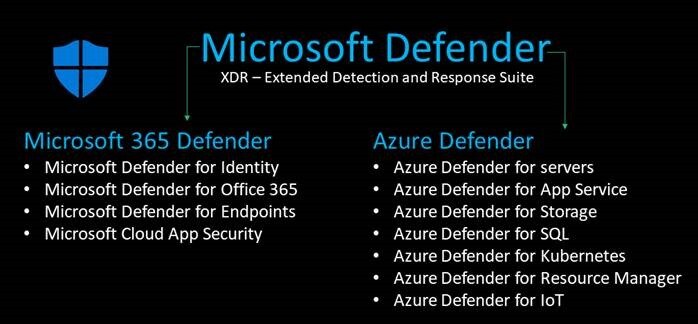
Microsoft 365 Defender
- Microsoft Defender for Identity – portal.atp.azure.com
- Microsoft Defender for Office 365 – protection.office.com
- Microsoft Defender for Endpoints – securitycenter.windows.com
- Microsoft Cloud App Security – portal.cloudappsecurity.com
Azure Defender
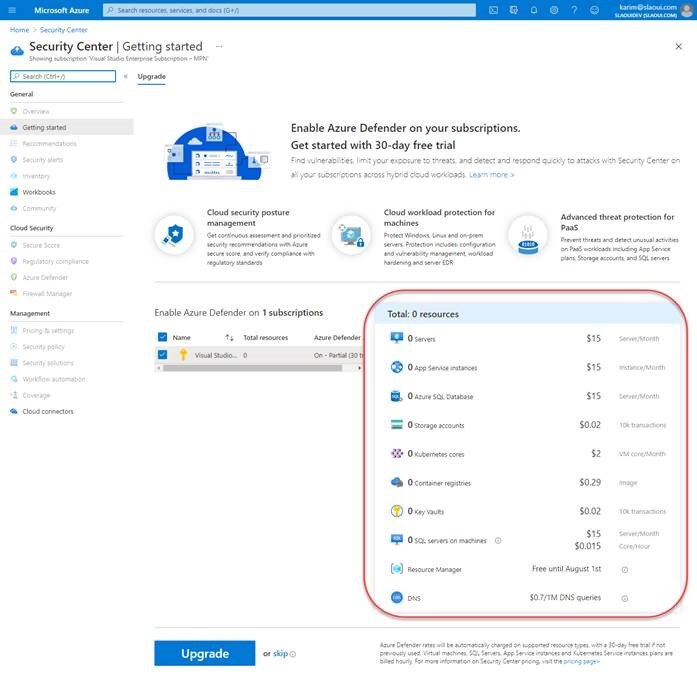
Azure Defender services are all centralized in the Azure Portal under the Azure Security Centre blade – portal.azure.com/#blade/Microsoft_Azure_Security/SecurityMenuBlade
- Azure Defender for Servers
- Azure Defender for App Service
- Azure Defender for Storage
- Azure Defender for SQL
- Azure Defender for Kubernetes
- Azure Defender for Resource Manager
- Azure Defender for IoT