
%20(1).png)
Hands up if you’ve ever forgotten someone in a group email 🙋🏻♂️
Sometimes it’s helpful to be able to email groups of people all at once, without having to...
The native Gmail application in Chrome browser is hands-down the most secure, productive and feature-rich email experience available.
Problem is, when you click email links on the web, most desktop and laptop computers will create a new email message in the operating system’s default email client.
To automatically open email links in Gmail instead of your computer’s default email client, you need to set Gmail as the default email application, instead.
Once you’ve set this up, clicking email links will open the Gmail compose window in a new Chrome tab with a pre-filled To: email address field.
MacOS
Open the Mail app
Hit ⌘, on the keyboard or click Mail then Preferences in the menu bar
Choose Google Chrome from the Default email reader menu
Windows
Open Settings
Under Apps, click Default Apps
In the right panel, under Email, choose Google Chrome
In your Chrome Browser's address bar, enter mail.google.com
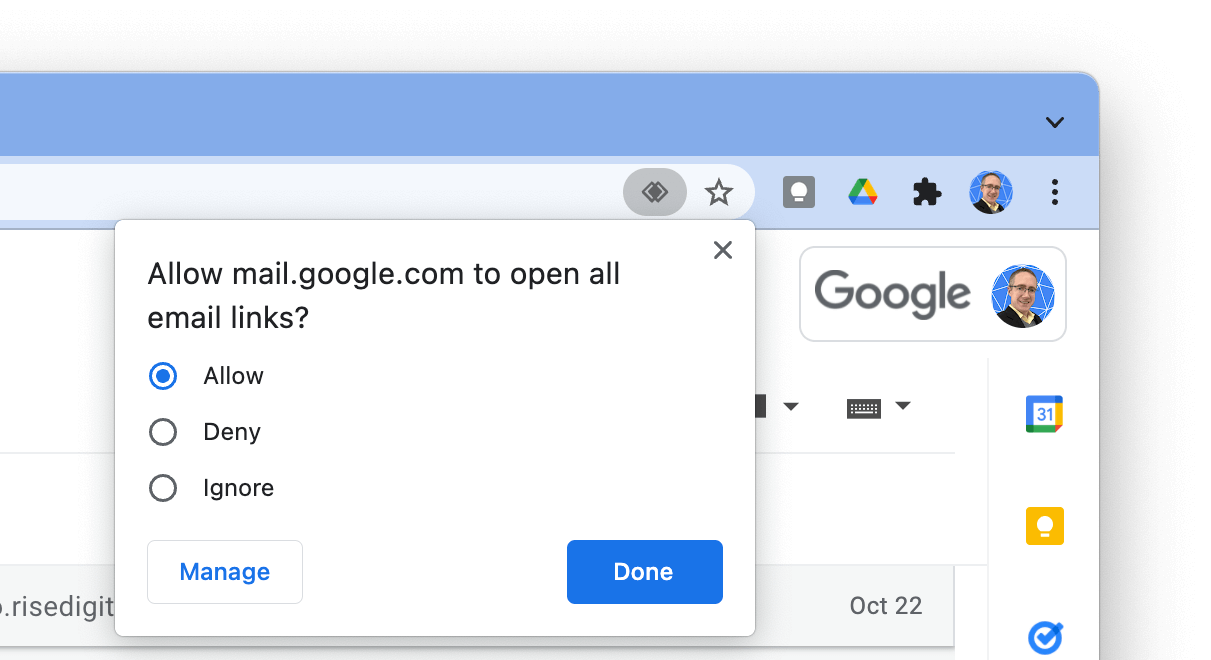
Click the Service handler icon on the right side of the address bar
Click Allow, then Done
If you don’t see Service Handler in Chrome’s address bar, do the following, then refresh your Gmail tab and try again:
Open Chrome Browser and click More then Settings
Click on Privacy and security
Click Site Settings
Expand Additional permissions
Click Protocol handlers
At the top, select Sites can ask to handle protocols
Scroll down to the Email section and remove mail.google.com if it appears in this list
Hands up if you’ve ever forgotten someone in a group email 🙋🏻♂️
Sometimes it’s helpful to be able to email groups of people all at once, without having to...
Can you guess what’s the first thing people open most mornings?
You guessed it: Gmail!
Perhaps you’re like me, and never close Gmail in the first place. 🙋🏻♂️
...