
The big takeaways:
The big takeaways:
Manual litigation tracking may have been the norm for decades, but it doesn’t scale with modern caseloads or team demands. As demands tighten and expectations grow, firms need an automated, more efficient approach, one that reduces administrative friction. For litigation firms managing many complex cases and overlapping trial schedules, investing in litigation tracking software is often the difference between chaos and control.
Using a flexible practice management software built for litigation firms not only consolidates information, it adds a layer of reliability that manual methods can’t match.
Litigation teams often rely on manual processes that create inefficiencies, lost time, and unnecessary risk. This can look like:
The result is wasted time, duplicated effort, and costly delays that look like:
The shortcomings of manual tracking have made many firms explore automated litigation management software, but not all tools are created equal. Litigation support technology needs to actually work the way attorneys work; from intake and docketing to trial prep and client reporting.
Modern, automated litigation platforms should include:
Automated litigation software should offer a unified calendar that all team members can access in real time, with built-in alerts and reminders that keep everyone on schedule. Centralized calendaring reduces the risk of double-booking, ensures visibility across the entire firm, and makes collaboration seamless, whether your team is in the office or working remotely.

Different courts have different filing deadlines, which makes manual tracking complex and error-prone. Litigation management software should include automated deadline tracking and rules-based capabilities that apply the rules of the specific jurisdiction, helping attorneys stay compliant and avoid costly mistakes. This feature saves valuable time and reduces the administrative burden of cross-checking filing requirements. CARET Legal integrates with LawToolBox to provide these features.
You know how quickly litigation files can spiral; depending on the case type, that means multiple drafts of pleadings, exhibits exchanged in discovery, scanned medical records, deposition transcripts. Without the right system, trial prep turns into version chaos.
Modern litigation software should give you both automated document summaries and version control. Quick summary capabilities makes every scanned PDF searchable, so when you need to pull a date from a medical chart or find a clause buried in a policy, you don’t waste hours flipping pages. Additionally it allows teams to manage and review large volumes of electronic evidence without losing track of what’s pending. Version control keeps your team on the same page, tracking every revision and linking documents directly to the matter.
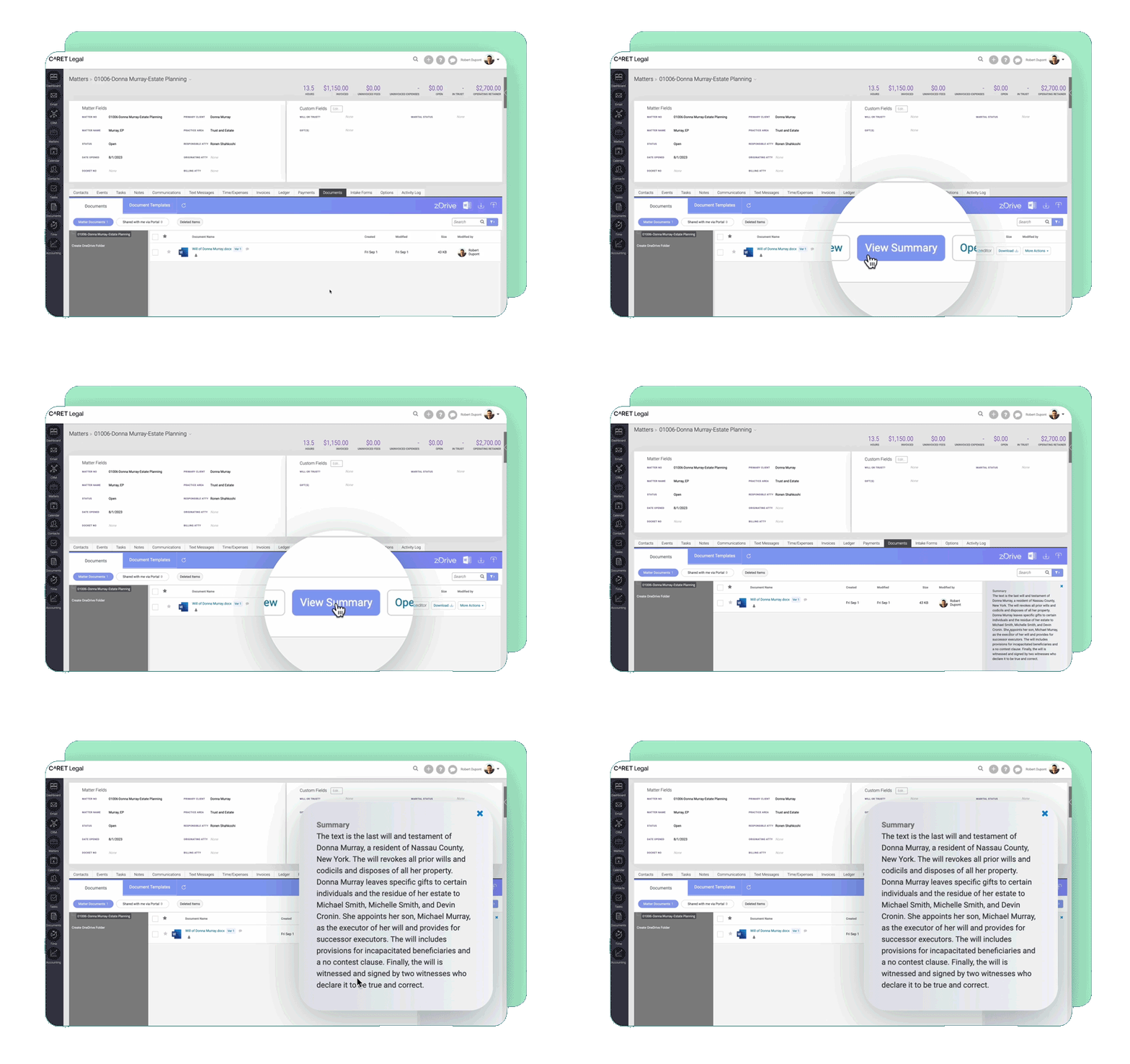
The result: you’re not second-guessing whether you have the right file, you know you do. And when trial hits, you walk into court with confidence, because every record, every exhibit, every transcript is exactly where you need it.
Litigation workflow automation helps firms stay organized by assigning tasks to the right team members, setting deadlines, and sending reminders automatically. By standardizing these processes, firms can improve efficiency, maintain consistency across cases, and ensure that no detail falls through the cracks.
Workflow templates can standardize routine tasks like:
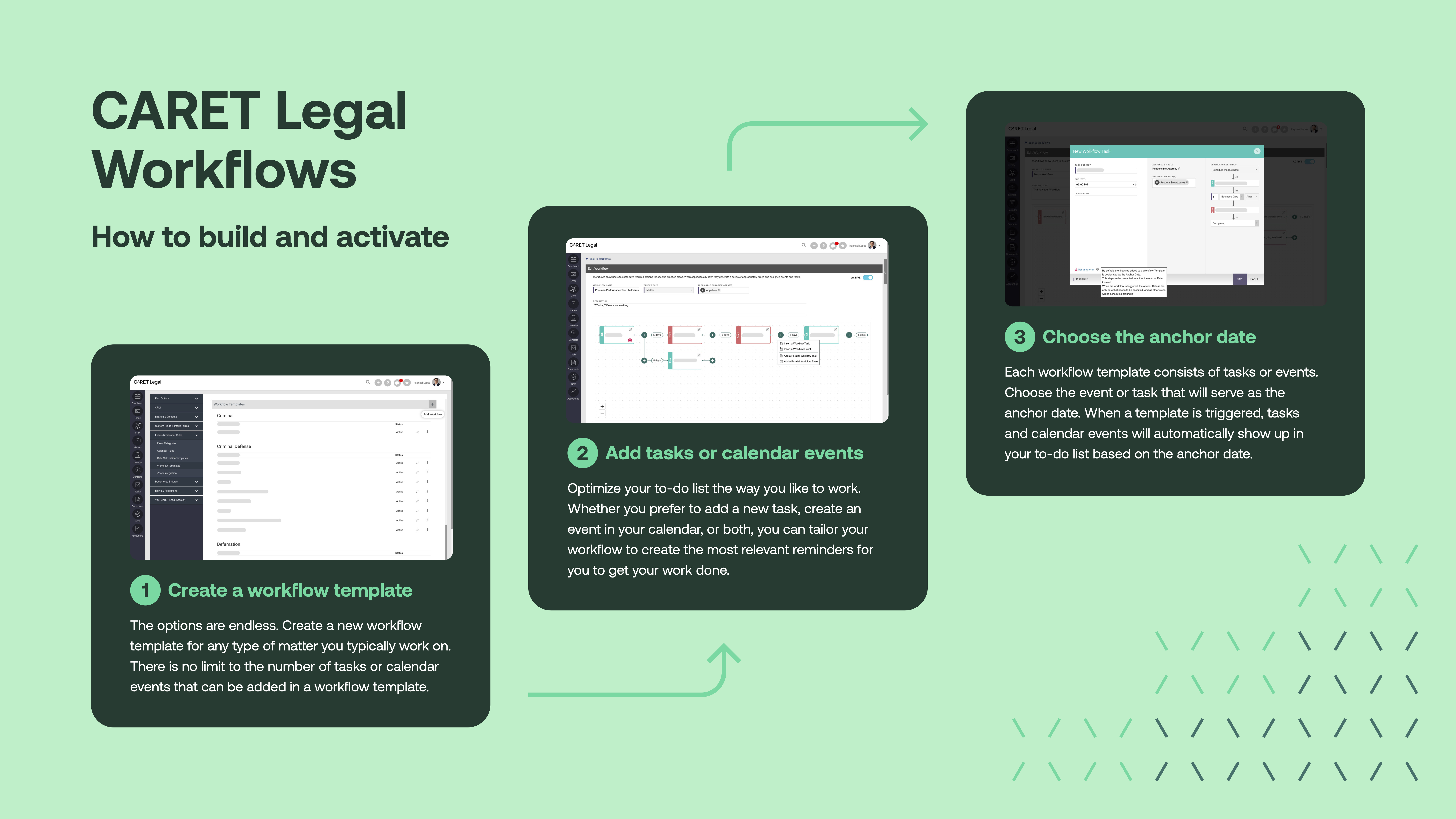
Workflow automation is especially valuable for growing firms that are scaling their litigation departments and need consistency across attorneys, paralegals, and administrative staff. By streamlining workflows and centralizing case management, CARET Legal gives litigators the confidence that nothing will be overlooked.
CARET Legal combines workflow automation with other litigation case management features, allowing firms to manage tasks, timelines, documents, and communications in one unified space.
Flexible practice management software built for litigation adds a layer of reliability that manual methods can’t match. With automated task triggers and pre-configured workflows, litigation teams know what’s due, when it’s due, and who’s responsible for each step.
Instead of relying on memory or spreadsheets, litigation teams can:
These benefits extend well beyond internal efficiency. By maintaining consistent timelines, firms deliver a steadier client experience. Clients no longer wait for updates or follow up on overdue tasks because the platform is already tracking—and prompting—each next step.
Start a free trial today.
The big takeaways:

By automating repetitive manual tasks, AI reduces document review time and allows attorneys to focus on critical case elements.